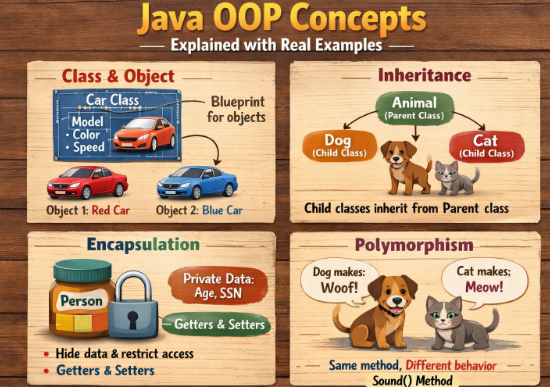
Object-Oriented Programming (OOP) is the backbone of modern Java development. If you want to become a serious Java developer, understanding OOP concepts is not optional. Almost every Java application—from Android apps to enterprise software—relies heavily on these principles.
Java uses OOP to organize code in a way that makes it reusable, scalable, and easier to maintain. Instead of writing everything in one long block of code, developers structure programs using objects and classes that represent real-world entities.
This guide explains the core Java OOP concepts with clear examples so beginners can understand how they actually work in practice.
What is Object-Oriented Programming in Java?
Object-Oriented Programming is a programming paradigm that organizes software design around objects rather than functions.
An object represents a real-world entity that contains data and behavior. In Java, objects are created from classes.
A class is like a blueprint, and an object is the real instance created from that blueprint.
Example
String color;
int speed;
void drive() {
System.out.println(“The car is driving”);
}
}
public class Main {
public static void main(String[] args) {
Car myCar = new Car();
myCar.color = “Red”;
myCar.speed = 120;
myCar.drive();
}
}
Here:
-
Caris the class -
myCaris the object
The object contains properties (color, speed) and behavior (drive).
The Four Pillars of Java OOP
Java OOP is built on four core principles:
-
Encapsulation
-
Inheritance
-
Polymorphism
-
Abstraction
These concepts make programs modular and flexible.
1. Encapsulation in Java
Encapsulation means hiding data and controlling access to it. Instead of allowing direct access to variables, Java uses private variables and public methods (getters and setters).
This protects the internal state of an object.
Example
private int age;
public void setAge(int age) {
this.age = age;
}
public int getAge() {
return age;
}
}
Usage:
s.setAge(20);
System.out.println(s.getAge());
Why encapsulation matters:
-
Protects data from accidental modification
-
Makes code more secure
-
Improves maintainability
Real-world example:
Think of a bank account. You cannot directly change the balance. Instead, you deposit or withdraw through controlled methods.
2. Inheritance in Java
Inheritance allows one class to acquire properties and methods from another class.
This helps avoid duplicate code and supports code reusability.
Example
void eat() {
System.out.println(“Animal is eating”);
}
}
class Dog extends Animal {
void bark() {
System.out.println(“Dog is barking”);
}
}
Usage:
d.eat();
d.bark();
Here:
-
Doginherits fromAnimal -
The dog can use both
eat()andbark()
Benefits of inheritance:
-
Code reuse
-
Easier maintenance
-
Faster development
Real-world example:
A Car is a Vehicle. A Bike is also a Vehicle. Both share common properties like speed and fuel.
3. Polymorphism in Java
Polymorphism means one action behaving differently in different situations.
In Java, polymorphism mainly happens in two ways:
-
Method Overloading
-
Method Overriding
Method Overloading
Multiple methods with the same name but different parameters.
Example
int add(int a, int b) {
return a + b;
}
int add(int a, int b, int c) {
return a + b + c;
}
}
Usage:
System.out.println(obj.add(5, 3));
System.out.println(obj.add(5, 3, 2));
Method Overriding
A child class provides a specific implementation of a parent class method.
Example
void sound() {
System.out.println(“Animal makes a sound”);
}
}
class Cat extends Animal {
void sound() {
System.out.println(“Cat meows”);
}
}
Usage:
a.sound();
Output:
Real-world example:
Different vehicles start differently:
-
Car → key ignition
-
Bike → self start
The action is “start”, but implementation changes.
4. Abstraction in Java
Abstraction means hiding complex implementation details and showing only essential features.
In Java, abstraction is achieved using:
-
Abstract classes
-
Interfaces
Abstract Class Example
abstract void start();
}
class Car extends Vehicle {
void start() {
System.out.println(“Car starts with key”);
}
}
Usage:
v.start();
The abstract class defines what should happen, while subclasses define how it happens.
Interface Example
void pay();
}
class CreditCard implements Payment {
public void pay() {
System.out.println(“Payment via Credit Card”);
}
}
Interfaces are heavily used in large Java applications and frameworks.
Why OOP is Important in Java
Understanding OOP is critical because it enables developers to build scalable and maintainable applications.
Major benefits include:
Code Reusability
Inheritance allows developers to reuse existing code instead of writing it again.
Better Code Organization
Classes and objects organize programs logically.
Easier Maintenance
Changes can be made in one class without affecting the entire system.
Real-World Modeling
OOP models real-world systems like banking, transportation, and e-commerce.
Real-World Example of OOP in Java
Consider an online shopping system.
Classes could include:
-
User
-
Product
-
Cart
-
Payment
Each object represents a real-world entity.
Example:
String name;
double price;
void displayProduct() {
System.out.println(name + ” : “ + price);
}
}
A shopping application might create hundreds of product objects using the same class.
This shows how OOP simplifies complex systems.
Final Thoughts
Java Object-Oriented Programming concepts are the foundation of professional Java development. Encapsulation protects data, inheritance promotes reuse, polymorphism enables flexibility, and abstraction hides complexity.
Many beginners try to memorize definitions, but the real understanding comes from building small programs and practicing these principles.
If you truly want to master Java, start writing simple projects like a student management system, library management system, or banking application. These projects force you to use all four OOP concepts together.
Once these fundamentals are clear, learning advanced frameworks like Spring Boot becomes much easier.